I am a photographer. As a photographer I shoot my images in RAW format. This gives me the greatest flexibility for post processing. But I hate the RAW photo editors, such as Darktable and RawTherapee. Don’t get me wrong, those are great tools, but I often just want to do some simple quick editing. Those tools have complicated user interfaces. So I wondered if I could use Claude Code to write a Raw Editor with a simple interface similar to the Samsung Galaxy photo editor that I use for editing phone images.
Short answer is Yes!
Before I get into the actual steps (which took less that an hour) let me show you what I came up with.
Here is the lighting page, after I have loaded a raw image. As you can see, the interface is very simple and clean. I can adjust the light, color, details (sharpening, denoise), and transforms (rotates and cropping).
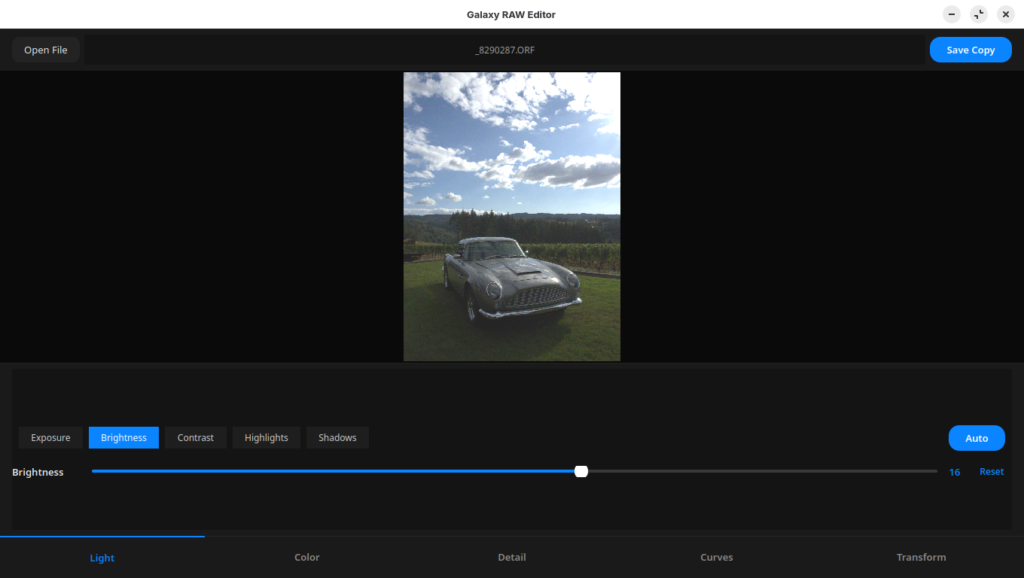
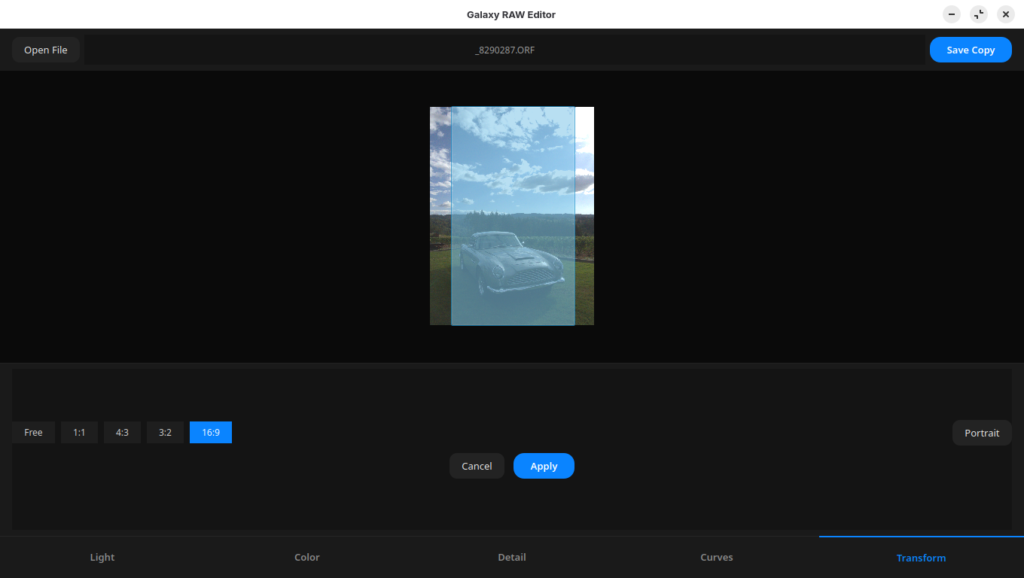
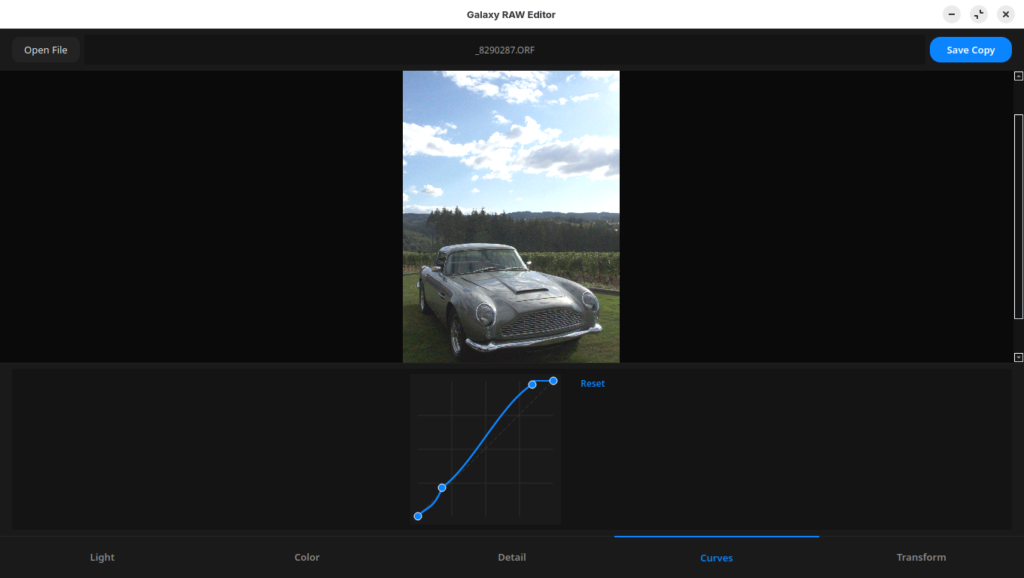
The basic tool was created in less than an hour. Tweaking and making adjustments has taken a couple of more hours. Note that I did no coding or interface design. Claude came up with all of that.
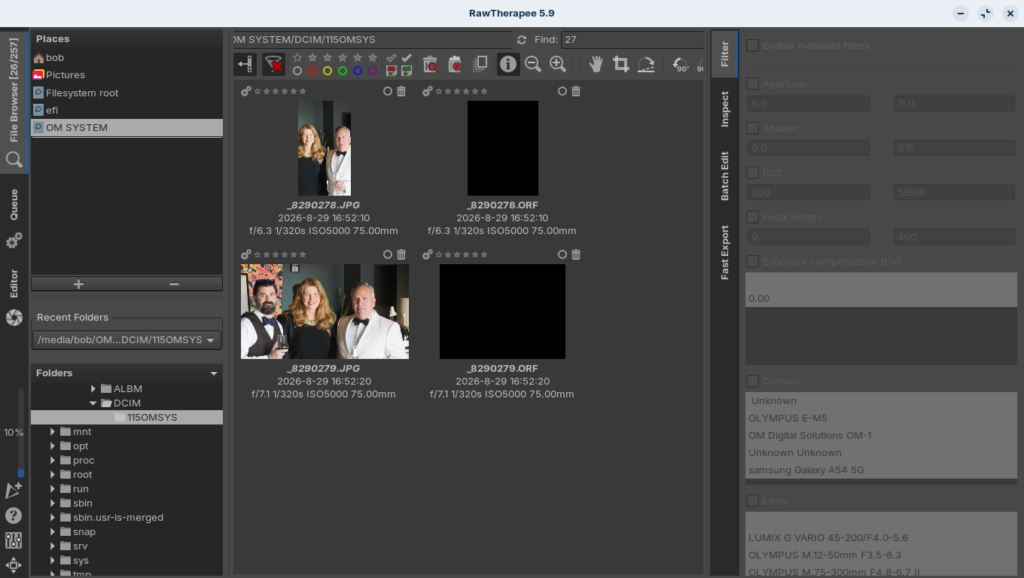
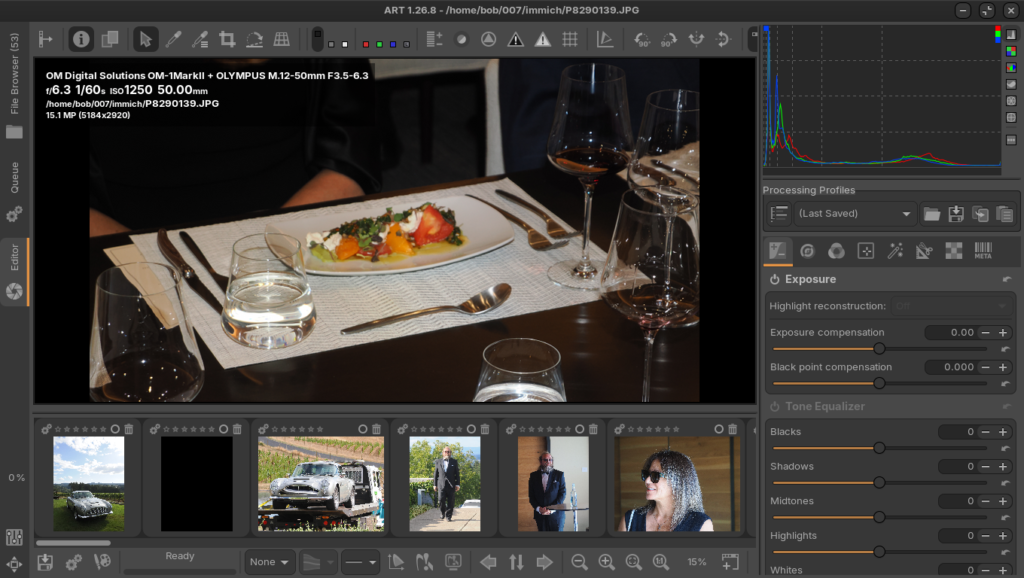
Compare this interface to RawTherapy and to ART.
The technical stuff
Below is the python code Claude wrote.
#!/usr/bin/env python3
"""Galaxy RAW Editor - a lightweight RAW photo editor for Linux styled after
Samsung's Galaxy (One UI) Photo Editor."""
import os
import sys
import cv2
import numpy as np
import rawpy
from PIL import Image
from PySide6.QtCore import QPointF, QRectF, Qt, QThread, QTimer, Signal
from PySide6.QtGui import QAction, QBrush, QColor, QCursor, QImage, QPainter, QPainterPath, QPen, QPixmap
from PySide6.QtWidgets import (
QApplication,
QButtonGroup,
QFileDialog,
QGraphicsPathItem,
QGraphicsPixmapItem,
QGraphicsRectItem,
QGraphicsScene,
QGraphicsView,
QHBoxLayout,
QLabel,
QMainWindow,
QMessageBox,
QPushButton,
QSizePolicy,
QSlider,
QStackedWidget,
QVBoxLayout,
QWidget,
)
APP_NAME = "Galaxy RAW Editor"
RAW_EXTS = {".orf", ".cr2", ".nef", ".arw", ".dng", ".raf", ".rw2", ".pef", ".srw"}
STANDARD_EXTS = {".jpg", ".jpeg", ".png", ".bmp", ".tif", ".tiff"}
MAX_PREVIEW_DIM = 1600
def _build_open_filter():
exts = sorted(RAW_EXTS | STANDARD_EXTS)
patterns = []
for ext in exts:
patterns.append(f"*{ext.lower()}")
patterns.append(f"*{ext.upper()}")
return "Images (" + " ".join(patterns) + ");;All Files (*)"
OPEN_FILTER = _build_open_filter()
# --------------------------------------------------------------------------
# Dark One UI-inspired stylesheet
# --------------------------------------------------------------------------
STYLE_SHEET = """
QMainWindow, QWidget {
background-color: #141414;
color: #e8e8e8;
font-family: 'Noto Sans', 'Ubuntu', 'Segoe UI', sans-serif;
font-size: 13px;
}
QLabel#fileLabel {
color: #9c9c9c;
font-size: 12px;
}
QLabel#sliderTitle {
color: #e8e8e8;
font-size: 13px;
font-weight: 600;
}
QLabel#sliderValue {
color: #0a84ff;
font-size: 13px;
font-weight: 600;
min-width: 34px;
}
QPushButton {
background-color: #232323;
border: none;
border-radius: 10px;
padding: 8px 16px;
color: #e8e8e8;
}
QPushButton:hover { background-color: #2e2e2e; }
QPushButton:pressed { background-color: #1a1a1a; }
QPushButton:disabled { color: #5a5a5a; background-color: #1a1a1a; }
QPushButton#primaryButton {
background-color: #0a84ff;
color: white;
font-weight: 600;
border-radius: 14px;
padding: 8px 22px;
}
QPushButton#primaryButton:hover { background-color: #2f95ff; }
QPushButton#primaryButton:disabled { background-color: #23405f; color: #7a8ba0; }
QPushButton#navButton {
background: transparent;
border: none;
border-radius: 0px;
padding: 12px 6px;
color: #8b8b8b;
font-weight: 600;
font-size: 13px;
}
QPushButton#navButton:checked {
color: #0a84ff;
border-top: 2px solid #0a84ff;
}
QPushButton#navButton:hover { color: #d0d0d0; }
QPushButton#chipButton {
background-color: #1e1e1e;
border-radius: 15px;
padding: 6px 16px;
font-size: 12px;
color: #cfcfcf;
}
QPushButton#chipButton:checked {
background-color: #0a84ff;
color: white;
}
QPushButton#resetButton {
background-color: transparent;
border-radius: 14px;
padding: 4px 10px;
color: #0a84ff;
font-size: 12px;
font-weight: 600;
}
QPushButton#resetButton:hover { background-color: #1e2b3a; }
QSlider::groove:horizontal {
height: 4px;
background: #3a3a3a;
border-radius: 2px;
}
QSlider::sub-page:horizontal {
background: #0a84ff;
border-radius: 2px;
}
QSlider::add-page:horizontal {
background: #3a3a3a;
border-radius: 2px;
}
QSlider::handle:horizontal {
background: #ffffff;
width: 18px;
height: 18px;
margin: -8px 0;
border-radius: 9px;
}
QGraphicsView {
background-color: #0a0a0a;
border: none;
}
#topBar, #sliderArea, #bottomNav {
background-color: #1a1a1a;
}
#bottomNav { border-top: 1px solid #262626; }
#sliderArea { border-top: 1px solid #222222; }
"""
# --------------------------------------------------------------------------
# Image processing engine
# --------------------------------------------------------------------------
class ImageEngine:
"""Loads images/RAW files and applies non-destructive adjustments."""
@staticmethod
def load_image(path):
ext = os.path.splitext(path)[1].lower()
if ext in RAW_EXTS:
with rawpy.imread(path) as raw:
rgb16 = raw.postprocess(
use_camera_wb=True,
no_auto_bright=False,
output_bps=16,
)
arr = rgb16.astype(np.float32) / 65535.0
else:
pil_img = Image.open(path)
pil_img = pil_img.convert("RGB")
arr = np.asarray(pil_img).astype(np.float32) / 255.0
return np.ascontiguousarray(arr)
@staticmethod
def make_preview(full, max_dim=MAX_PREVIEW_DIM):
h, w = full.shape[:2]
scale = min(1.0, max_dim / max(h, w))
if scale < 1.0:
new_w, new_h = max(1, int(w * scale)), max(1, int(h * scale))
return cv2.resize(full, (new_w, new_h), interpolation=cv2.INTER_AREA)
return full.copy()
# -- individual adjustment operators (float32 RGB, 0..1) --------------
@staticmethod
def _exposure(img, val):
if val == 0:
return img
stops = (val / 100.0) * 2.0
return img * (2.0 ** stops)
@staticmethod
def _brightness(img, val):
if val == 0:
return img
return img + (val / 100.0) * 0.5
@staticmethod
def _contrast(img, val):
if val == 0:
return img
factor = 1.0 + (val / 100.0)
return (img - 0.5) * factor + 0.5
@staticmethod
def _highlights_shadows(img, highlights, shadows):
if highlights == 0 and shadows == 0:
return img
luminance = (img[..., 0] * 0.299 + img[..., 1] * 0.587 + img[..., 2] * 0.114)
luminance = luminance[..., None]
out = img
if highlights != 0:
amt = highlights / 100.0
mask = np.clip(luminance * 2.0 - 1.0, 0.0, 1.0)
out = out - amt * mask * out * 0.6
if shadows != 0:
amt = shadows / 100.0
mask = np.clip(1.0 - luminance * 2.0, 0.0, 1.0)
out = out + amt * mask * (1.0 - out) * 0.6
return out
@staticmethod
def _temperature_tint(img, temp, tint):
if temp == 0 and tint == 0:
return img
out = img.copy()
t = (temp / 100.0) * 0.25
ti = (tint / 100.0) * 0.25
out[..., 0] = out[..., 0] + t
out[..., 2] = out[..., 2] - t
out[..., 1] = out[..., 1] + ti
return out
@staticmethod
def _saturation_vibrance(img, sat, vib):
if sat == 0 and vib == 0:
return img
clipped = np.clip(img, 0.0, 1.0).astype(np.float32)
hsv = cv2.cvtColor(clipped, cv2.COLOR_RGB2HSV)
s = hsv[..., 1]
if sat != 0:
s = s * (1.0 + sat / 100.0)
if vib != 0:
boost = (1.0 - s) * (vib / 100.0)
s = s + boost * s
hsv[..., 1] = np.clip(s, 0.0, 1.0)
return cv2.cvtColor(hsv, cv2.COLOR_HSV2RGB)
@staticmethod
def _denoise(img, val):
if val <= 0:
return img
amount = val / 100.0
sigma_color = 10 + amount * 90
sigma_space = 10 + amount * 90
arr8 = (np.clip(img, 0.0, 1.0) * 255.0).astype(np.uint8)
denoised = cv2.bilateralFilter(arr8, 5, sigma_color, sigma_space)
return denoised.astype(np.float32) / 255.0
@staticmethod
def _clarity(img, val):
if val == 0:
return img
amount = val / 100.0
blur = cv2.GaussianBlur(img, (0, 0), 20)
return img + (img - blur) * amount * 0.6
@staticmethod
def _sharpen(img, val):
if val <= 0:
return img
amount = (val / 100.0) * 1.5
blur = cv2.GaussianBlur(img, (0, 0), 2.0)
return img + (img - blur) * amount
@staticmethod
def curve_lut(points):
"""Build a smooth 256-entry lookup table (0..1) from control points
given in 0..255 space, using a Catmull-Rom spline through them."""
pts = sorted(points, key=lambda p: p[0])
xs = np.array([p[0] for p in pts], dtype=np.float64)
ys = np.array([p[1] for p in pts], dtype=np.float64)
n = len(pts)
sample_x = np.arange(256, dtype=np.float64)
if n < 2:
return np.clip(sample_x / 255.0, 0.0, 1.0)
lead_dx = xs[1] - xs[0] if xs[1] != xs[0] else 1.0
tail_dx = xs[-1] - xs[-2] if xs[-1] != xs[-2] else 1.0
ext_x = np.concatenate(([xs[0] - lead_dx], xs, [xs[-1] + tail_dx]))
ext_y = np.concatenate(([ys[0] - (ys[1] - ys[0])], ys, [ys[-1] + (ys[-1] - ys[-2])]))
sample_y = np.interp(sample_x, xs, ys) # fallback / base (linear)
for i in range(1, len(ext_x) - 2):
x0, x1, x2, x3 = ext_x[i - 1:i + 3]
y0, y1, y2, y3 = ext_y[i - 1:i + 3]
if x2 <= x1:
continue
mask = (sample_x >= x1) & (sample_x <= x2)
if not np.any(mask):
continue
t = (sample_x[mask] - x1) / (x2 - x1)
t2 = t * t
t3 = t2 * t
y = 0.5 * (
(2 * y1)
+ (-y0 + y2) * t
+ (2 * y0 - 5 * y1 + 4 * y2 - y3) * t2
+ (-y0 + 3 * y1 - 3 * y2 + y3) * t3
)
sample_y[mask] = y
sample_y = np.clip(sample_y, 0.0, 255.0)
return (sample_y / 255.0).astype(np.float32)
@staticmethod
def _apply_curve(img, lut):
if lut is None:
return img
idx = np.clip(img * 255.0, 0, 255).astype(np.uint8)
return lut[idx]
@classmethod
def render(cls, base, params, curve_lut=None):
out = base.astype(np.float32, copy=True)
out = cls._exposure(out, params["exposure"])
out = cls._brightness(out, params["brightness"])
out = cls._contrast(out, params["contrast"])
out = cls._highlights_shadows(out, params["highlights"], params["shadows"])
out = np.clip(out, 0.0, 1.0)
out = cls._apply_curve(out, curve_lut)
out = cls._temperature_tint(out, params["temperature"], params["tint"])
out = cls._saturation_vibrance(out, params["saturation"], params["vibrance"])
out = cls._denoise(out, params["denoise"])
out = cls._clarity(out, params["clarity"])
out = cls._sharpen(out, params["sharpening"])
return np.clip(out, 0.0, 1.0)
@staticmethod
def to_qimage(img_float):
arr8 = (np.clip(img_float, 0.0, 1.0) * 255.0 + 0.5).astype(np.uint8)
arr8 = np.ascontiguousarray(arr8)
h, w, _ = arr8.shape
qimg = QImage(arr8.data, w, h, w * 3, QImage.Format_RGB888)
return qimg.copy()
@staticmethod
def export(full_base, params, path, curve_lut=None):
out = ImageEngine.render(full_base, params, curve_lut)
arr8 = (np.clip(out, 0.0, 1.0) * 255.0 + 0.5).astype(np.uint8)
img = Image.fromarray(arr8, mode="RGB")
ext = os.path.splitext(path)[1].lower()
if ext in (".jpg", ".jpeg"):
img.save(path, quality=95, subsampling=0)
else:
img.save(path)
def default_params():
return {
"exposure": 0,
"brightness": 0,
"contrast": 0,
"highlights": 0,
"shadows": 0,
"temperature": 0,
"tint": 0,
"saturation": 0,
"vibrance": 0,
"sharpening": 0,
"clarity": 0,
"denoise": 0,
}
DEFAULT_CURVE_POINTS = [(0, 0), (255, 255)]
# --------------------------------------------------------------------------
# Background loader thread (keeps UI responsive while decoding RAW files)
# --------------------------------------------------------------------------
class LoadThread(QThread):
loaded = Signal(object)
failed = Signal(str)
def __init__(self, path):
super().__init__()
self.path = path
def run(self):
try:
arr = ImageEngine.load_image(self.path)
self.loaded.emit(arr)
except Exception as exc: # noqa: BLE001
self.failed.emit(str(exc))
# --------------------------------------------------------------------------
# Curves editor
# --------------------------------------------------------------------------
class CurvesWidget(QWidget):
curveChanged = Signal(list)
PADDING = 10
def __init__(self):
super().__init__()
self.setMinimumSize(180, 180)
self.setMaximumHeight(220)
self.setSizePolicy(QSizePolicy.Fixed, QSizePolicy.Fixed)
self.setFixedSize(200, 200)
self.points = list(DEFAULT_CURVE_POINTS)
self._drag_index = None
def reset(self):
self.points = list(DEFAULT_CURVE_POINTS)
self.update()
self.curveChanged.emit(self.points)
def _plot_rect(self):
return self.rect().adjusted(self.PADDING, self.PADDING, -self.PADDING, -self.PADDING)
def _to_widget(self, px, py):
r = self._plot_rect()
x = r.left() + (px / 255.0) * r.width()
y = r.bottom() - (py / 255.0) * r.height()
return QPointF(x, y)
def _to_curve(self, wx, wy):
r = self._plot_rect()
px = (wx - r.left()) / max(1, r.width()) * 255.0
py = (r.bottom() - wy) / max(1, r.height()) * 255.0
return max(0.0, min(255.0, px)), max(0.0, min(255.0, py))
def paintEvent(self, event):
painter = QPainter(self)
painter.setRenderHint(QPainter.Antialiasing)
r = self._plot_rect()
painter.fillRect(self.rect(), QColor("#1a1a1a"))
painter.setPen(QPen(QColor("#2c2c2c"), 1))
for i in range(1, 4):
x = r.left() + r.width() * i / 4
painter.drawLine(QPointF(x, r.top()), QPointF(x, r.bottom()))
y = r.top() + r.height() * i / 4
painter.drawLine(QPointF(r.left(), y), QPointF(r.right(), y))
painter.setPen(QPen(QColor("#3a3a3a"), 1, Qt.DashLine))
painter.drawLine(QPointF(r.left(), r.bottom()), QPointF(r.right(), r.top()))
lut = ImageEngine.curve_lut(self.points)
path_points = [self._to_widget(x, lut[x] * 255.0) for x in range(256)]
painter.setPen(QPen(QColor("#0a84ff"), 2))
for a, b in zip(path_points, path_points[1:]):
painter.drawLine(a, b)
painter.setPen(QPen(QColor("#ffffff"), 1))
painter.setBrush(QColor("#0a84ff"))
for px, py in self.points:
wp = self._to_widget(px, py)
painter.drawEllipse(wp, 5, 5)
def _nearest_point_index(self, pos):
for i, (px, py) in enumerate(self.points):
wp = self._to_widget(px, py)
if (wp - QPointF(pos)).manhattanLength() < 14:
return i
return None
def mousePressEvent(self, event):
if event.button() != Qt.LeftButton:
return
idx = self._nearest_point_index(event.pos())
if idx is not None:
self._drag_index = idx
else:
cx, cy = self._to_curve(event.pos().x(), event.pos().y())
self.points.append((cx, cy))
self.points.sort(key=lambda p: p[0])
self._drag_index = self.points.index((cx, cy))
self.update()
self.curveChanged.emit(self.points)
def mouseMoveEvent(self, event):
if self._drag_index is None:
return
cx, cy = self._to_curve(event.pos().x(), event.pos().y())
idx = self._drag_index
if idx == 0:
cx = 0.0
elif idx == len(self.points) - 1:
cx = 255.0
else:
lo = self.points[idx - 1][0] + 2
hi = self.points[idx + 1][0] - 2
cx = max(lo, min(hi, cx))
self.points[idx] = (cx, cy)
self.update()
self.curveChanged.emit(self.points)
def mouseReleaseEvent(self, event):
self._drag_index = None
def mouseDoubleClickEvent(self, event):
idx = self._nearest_point_index(event.pos())
if idx is not None and 0 < idx < len(self.points) - 1:
del self.points[idx]
self.update()
self.curveChanged.emit(self.points)
# --------------------------------------------------------------------------
# Canvas: zoom / pan / crop
# --------------------------------------------------------------------------
class CanvasView(QGraphicsView):
def __init__(self):
super().__init__()
self._scene = QGraphicsScene(self)
self.setScene(self._scene)
self.pixmap_item = QGraphicsPixmapItem()
self._scene.addItem(self.pixmap_item)
self.crop_overlay_item = QGraphicsPathItem()
self.crop_overlay_item.setPen(QPen(Qt.NoPen))
self.crop_overlay_item.setBrush(QBrush(QColor(0, 0, 0, 140)))
self.crop_overlay_item.setZValue(10)
self.crop_overlay_item.setVisible(False)
self._scene.addItem(self.crop_overlay_item)
self.crop_border_item = QGraphicsRectItem()
self.crop_border_item.setPen(QPen(QColor("#0a84ff"), 2, Qt.DashLine))
self.crop_border_item.setBrush(QBrush(Qt.NoBrush))
self.crop_border_item.setZValue(11)
self.crop_border_item.setVisible(False)
self._scene.addItem(self.crop_border_item)
self.setDragMode(QGraphicsView.ScrollHandDrag)
self.setRenderHints(QPainter.SmoothPixmapTransform | QPainter.Antialiasing)
self.setHorizontalScrollBarPolicy(Qt.ScrollBarAsNeeded)
self.setVerticalScrollBarPolicy(Qt.ScrollBarAsNeeded)
self._zoom = 1.0
self.crop_mode = False
self.crop_aspect = None # None = free, else (w_ratio, h_ratio)
self.crop_rect = None # QRectF in scene (image-pixel) coordinates
self._interaction = None # None | "draw" | "move"
self._draw_origin = None
self._move_anchor = None
self._move_orig_rect = None
def set_pixmap(self, pixmap, fit=False):
self.pixmap_item.setPixmap(pixmap)
self._scene.setSceneRect(QRectF(pixmap.rect()))
if fit:
self.fit_to_window()
def fit_to_window(self):
if self.pixmap_item.pixmap().isNull():
return
self.resetTransform()
self.fitInView(self.pixmap_item, Qt.KeepAspectRatio)
self._zoom = self.transform().m11()
def wheelEvent(self, event):
if self.pixmap_item.pixmap().isNull():
return
factor = 1.15 if event.angleDelta().y() > 0 else 1.0 / 1.15
new_zoom = self._zoom * factor
if 0.05 < new_zoom < 12.0:
self.scale(factor, factor)
self._zoom = new_zoom
def set_crop_mode(self, enabled):
self.crop_mode = enabled
if enabled:
self.setDragMode(QGraphicsView.NoDrag)
self.setCursor(QCursor(Qt.CrossCursor))
self._update_crop_visual()
else:
self.setDragMode(QGraphicsView.ScrollHandDrag)
self.unsetCursor()
self.clear_crop_selection()
def set_crop_aspect(self, ratio):
"""ratio: None for free-form, or (w, h) tuple such as (16, 9)."""
self.crop_aspect = ratio
def clear_crop_selection(self):
self._interaction = None
self.crop_rect = None
self.crop_border_item.setVisible(False)
self.crop_overlay_item.setVisible(False)
def _update_crop_visual(self):
if self.crop_rect is None:
self.crop_border_item.setVisible(False)
self.crop_overlay_item.setVisible(False)
return
self.crop_border_item.setRect(self.crop_rect)
self.crop_border_item.setVisible(True)
path = QPainterPath()
path.setFillRule(Qt.OddEvenFill)
path.addRect(self._scene.sceneRect())
path.addRect(self.crop_rect)
self.crop_overlay_item.setPath(path)
self.crop_overlay_item.setVisible(True)
def _draw_rect(self, origin, current):
"""Compute a crop rect anchored at `origin`, clipped so it never
exceeds the photo's bounding box, preserving the locked aspect
ratio (if any)."""
bounds = self._scene.sceneRect()
if self.crop_aspect is None:
return QRectF(origin, current).normalized().intersected(bounds)
w_r, h_r = self.crop_aspect
dx = current.x() - origin.x()
dy = current.y() - origin.y()
sign_x = 1.0 if dx >= 0 else -1.0
sign_y = 1.0 if dy >= 0 else -1.0
w = abs(dx) if dx != 0 else 1.0
max_w_x = (bounds.right() - origin.x()) if sign_x > 0 else (origin.x() - bounds.left())
max_h_y = (bounds.bottom() - origin.y()) if sign_y > 0 else (origin.y() - bounds.top())
max_w_from_h = max_h_y * (w_r / h_r)
w = max(1.0, min(w, max_w_x, max_w_from_h))
h = w * (h_r / w_r)
end = QPointF(origin.x() + sign_x * w, origin.y() + sign_y * h)
return QRectF(origin, end).normalized()
def _clamp_to_bounds(self, rect):
"""Slide (without resizing) a rect so it stays fully inside the
photo's bounding box. The crop rect is always created within
bounds, so it can never be larger than the photo itself."""
bounds = self._scene.sceneRect()
dx = 0.0
if rect.left() < bounds.left():
dx = bounds.left() - rect.left()
elif rect.right() > bounds.right():
dx = bounds.right() - rect.right()
dy = 0.0
if rect.top() < bounds.top():
dy = bounds.top() - rect.top()
elif rect.bottom() > bounds.bottom():
dy = bounds.bottom() - rect.bottom()
return rect.translated(dx, dy)
def mousePressEvent(self, event):
if self.crop_mode and event.button() == Qt.LeftButton:
scene_pos = self.mapToScene(event.pos())
if self.crop_rect is not None and self.crop_rect.contains(scene_pos):
self._interaction = "move"
self._move_anchor = scene_pos
self._move_orig_rect = QRectF(self.crop_rect)
else:
self._interaction = "draw"
self._draw_origin = scene_pos
self.crop_rect = QRectF(scene_pos, scene_pos)
self._update_crop_visual()
else:
super().mousePressEvent(event)
def mouseMoveEvent(self, event):
if self.crop_mode and self._interaction is not None:
scene_pos = self.mapToScene(event.pos())
if self._interaction == "draw":
self.crop_rect = self._draw_rect(self._draw_origin, scene_pos)
elif self._interaction == "move":
delta = scene_pos - self._move_anchor
moved = self._move_orig_rect.translated(delta.x(), delta.y())
self.crop_rect = self._clamp_to_bounds(moved)
self._update_crop_visual()
else:
super().mouseMoveEvent(event)
def mouseReleaseEvent(self, event):
if self.crop_mode and self._interaction is not None:
self._interaction = None
if self.crop_rect is not None and (
self.crop_rect.width() < 5 or self.crop_rect.height() < 5
):
self.crop_rect = None
self._update_crop_visual()
else:
super().mouseReleaseEvent(event)
# --------------------------------------------------------------------------
# Tab / slider definitions
# --------------------------------------------------------------------------
TABS = {
"Light": [
("exposure", "Exposure", -100, 100),
("brightness", "Brightness", -100, 100),
("contrast", "Contrast", -100, 100),
("highlights", "Highlights", -100, 100),
("shadows", "Shadows", -100, 100),
],
"Color": [
("temperature", "Temperature", -100, 100),
("tint", "Tint", -100, 100),
("saturation", "Saturation", -100, 100),
("vibrance", "Vibrance", -100, 100),
],
"Detail": [
("sharpening", "Sharpening", 0, 100),
("clarity", "Clarity", -100, 100),
("denoise", "Denoise", 0, 100),
],
}
NAV_ORDER = ["Light", "Color", "Detail", "Curves", "Transform"]
AUTO_SUPPORTED_KEYS = {"exposure", "contrast"}
CROP_PRESETS = [
("Free", None),
("1:1", (1, 1)),
("4:3", (4, 3)),
("3:2", (3, 2)),
("16:9", (16, 9)),
]
# --------------------------------------------------------------------------
# Main window
# --------------------------------------------------------------------------
class MainWindow(QMainWindow):
def __init__(self):
super().__init__()
self.setWindowTitle(APP_NAME)
self.resize(1200, 800)
self.params = default_params()
self.crop_base_ratio = None
self.crop_landscape = True
self.curve_points = list(DEFAULT_CURVE_POINTS)
self.curve_lut = ImageEngine.curve_lut(self.curve_points)
self.full_base = None
self.preview_base = None
self.current_path = None
self.current_param_key = None
self.load_thread = None
self.auto_btn = None
self._debounce = QTimer(self)
self._debounce.setSingleShot(True)
self._debounce.timeout.connect(self.refresh_preview)
self._build_ui()
self._select_tab("Light")
# -- UI construction ----------------------------------------------
def _build_ui(self):
central = QWidget()
self.setCentralWidget(central)
root = QVBoxLayout(central)
root.setContentsMargins(0, 0, 0, 0)
root.setSpacing(0)
root.addWidget(self._build_top_bar())
self.canvas = CanvasView()
root.addWidget(self.canvas, stretch=1)
root.addWidget(self._build_slider_area())
root.addWidget(self._build_bottom_nav())
def _build_top_bar(self):
bar = QWidget()
bar.setObjectName("topBar")
bar.setFixedHeight(56)
layout = QHBoxLayout(bar)
layout.setContentsMargins(16, 8, 16, 8)
self.open_btn = QPushButton("Open File")
self.open_btn.clicked.connect(self.open_file)
layout.addWidget(self.open_btn)
self.file_label = QLabel("No image loaded")
self.file_label.setObjectName("fileLabel")
layout.addWidget(self.file_label, stretch=1)
self.file_label.setAlignment(Qt.AlignCenter)
self.save_btn = QPushButton("Save Copy")
self.save_btn.setObjectName("primaryButton")
self.save_btn.setEnabled(False)
self.save_btn.clicked.connect(self.save_copy)
layout.addWidget(self.save_btn)
return bar
def _build_slider_area(self):
area = QWidget()
area.setObjectName("sliderArea")
area.setFixedHeight(230)
outer = QVBoxLayout(area)
outer.setContentsMargins(16, 8, 16, 8)
self.slider_stack = QStackedWidget()
outer.addWidget(self.slider_stack)
# -- page 0: parameter sliders (shared across Light/Color/Detail)
self.sliders_page = QWidget()
sp_layout = QVBoxLayout(self.sliders_page)
sp_layout.setContentsMargins(0, 0, 0, 0)
sp_layout.setSpacing(6)
self.chip_row = QHBoxLayout()
self.chip_row.setSpacing(8)
chip_row_widget = QWidget()
chip_row_widget.setLayout(self.chip_row)
sp_layout.addWidget(chip_row_widget)
slider_row = QHBoxLayout()
self.slider_title = QLabel("Exposure")
self.slider_title.setObjectName("sliderTitle")
self.slider_title.setFixedWidth(100)
slider_row.addWidget(self.slider_title)
self.slider = QSlider(Qt.Horizontal)
self.slider.setMinimum(-100)
self.slider.setMaximum(100)
self.slider.valueChanged.connect(self._on_slider_changed)
slider_row.addWidget(self.slider, stretch=1)
self.slider_value = QLabel("0")
self.slider_value.setObjectName("sliderValue")
self.slider_value.setAlignment(Qt.AlignCenter)
slider_row.addWidget(self.slider_value)
self.reset_btn = QPushButton("Reset")
self.reset_btn.setObjectName("resetButton")
self.reset_btn.clicked.connect(self._reset_current_slider)
slider_row.addWidget(self.reset_btn)
sp_layout.insertStretch(0, 1)
sp_layout.addLayout(slider_row)
sp_layout.addStretch(1)
self.slider_stack.addWidget(self.sliders_page)
# -- page 1: curves
self.curves_page = QWidget()
cv_layout = QHBoxLayout(self.curves_page)
cv_layout.setContentsMargins(0, 0, 0, 0)
cv_layout.setAlignment(Qt.AlignCenter)
cv_layout.setSpacing(16)
self.curves_widget = CurvesWidget()
self.curves_widget.curveChanged.connect(self._on_curve_changed)
cv_layout.addWidget(self.curves_widget)
curve_reset_btn = QPushButton("Reset")
curve_reset_btn.setObjectName("resetButton")
curve_reset_btn.clicked.connect(self._reset_curve)
cv_layout.addWidget(curve_reset_btn, alignment=Qt.AlignTop)
self.slider_stack.addWidget(self.curves_page)
# -- page 2: transform actions (default sub-page)
self.transform_page = QWidget()
tp_outer = QVBoxLayout(self.transform_page)
tp_outer.setContentsMargins(0, 0, 0, 0)
tp_outer.addStretch(1)
tp_row = QHBoxLayout()
tp_row.setSpacing(10)
tp_row.setAlignment(Qt.AlignCenter)
self.crop_btn = QPushButton("Crop")
self.crop_btn.clicked.connect(self._enter_crop_mode)
tp_row.addWidget(self.crop_btn)
rotate_btn = QPushButton("Rotate 90°")
rotate_btn.clicked.connect(self._rotate90)
tp_row.addWidget(rotate_btn)
flip_h_btn = QPushButton("Flip Horizontal")
flip_h_btn.clicked.connect(self._flip_horizontal)
tp_row.addWidget(flip_h_btn)
flip_v_btn = QPushButton("Flip Vertical")
flip_v_btn.clicked.connect(self._flip_vertical)
tp_row.addWidget(flip_v_btn)
tp_outer.addLayout(tp_row)
tp_outer.addStretch(1)
self.slider_stack.addWidget(self.transform_page)
# -- page 3: crop options (aspect presets + cancel/apply)
self.crop_options_page = QWidget()
cp_outer = QVBoxLayout(self.crop_options_page)
cp_outer.setContentsMargins(0, 0, 0, 0)
cp_outer.addStretch(1)
cp_layout = QVBoxLayout()
cp_layout.setSpacing(10)
preset_row = QHBoxLayout()
preset_row.setSpacing(8)
self.crop_preset_group = QButtonGroup(self)
self.crop_preset_group.setExclusive(True)
for label, ratio in CROP_PRESETS:
chip = QPushButton(label)
chip.setObjectName("chipButton")
chip.setCheckable(True)
chip.clicked.connect(lambda checked, r=ratio: self._set_crop_aspect(r))
self.crop_preset_group.addButton(chip)
preset_row.addWidget(chip)
preset_row.itemAt(0).widget().setChecked(True)
preset_row.addStretch(1)
self.orientation_btn = QPushButton("Landscape")
self.orientation_btn.setEnabled(False)
self.orientation_btn.clicked.connect(self._toggle_crop_orientation)
preset_row.addWidget(self.orientation_btn)
cp_layout.addLayout(preset_row)
action_row = QHBoxLayout()
action_row.setAlignment(Qt.AlignCenter)
action_row.setSpacing(12)
cancel_crop_btn = QPushButton("Cancel")
cancel_crop_btn.clicked.connect(self._cancel_crop)
action_row.addWidget(cancel_crop_btn)
apply_crop_btn = QPushButton("Apply")
apply_crop_btn.setObjectName("primaryButton")
apply_crop_btn.clicked.connect(self._confirm_crop)
action_row.addWidget(apply_crop_btn)
cp_layout.addLayout(action_row)
cp_outer.addLayout(cp_layout)
cp_outer.addStretch(1)
self.slider_stack.addWidget(self.crop_options_page)
return area
def _build_bottom_nav(self):
nav = QWidget()
nav.setObjectName("bottomNav")
nav.setFixedHeight(56)
layout = QHBoxLayout(nav)
layout.setContentsMargins(0, 0, 0, 0)
layout.setSpacing(0)
self.nav_group = QButtonGroup(self)
self.nav_group.setExclusive(True)
self.nav_buttons = {}
for name in NAV_ORDER:
btn = QPushButton(name)
btn.setObjectName("navButton")
btn.setCheckable(True)
btn.setSizePolicy(QSizePolicy.Expanding, QSizePolicy.Preferred)
btn.clicked.connect(lambda checked, n=name: self._select_tab(n))
self.nav_group.addButton(btn)
self.nav_buttons[name] = btn
layout.addWidget(btn)
return nav
# -- tab / chip handling --------------------------------------------
def _select_tab(self, name):
self.nav_buttons[name].setChecked(True)
self.canvas.set_crop_mode(False)
if name == "Transform":
self.slider_stack.setCurrentWidget(self.transform_page)
return
if name == "Curves":
self.slider_stack.setCurrentWidget(self.curves_page)
return
self.slider_stack.setCurrentWidget(self.sliders_page)
# rebuild chip row for this tab
while self.chip_row.count():
item = self.chip_row.takeAt(0)
if item.widget():
item.widget().deleteLater()
self.auto_btn = None
chip_group = QButtonGroup(self)
chip_group.setExclusive(True)
self._chip_group = chip_group
for key, label, lo, hi in TABS[name]:
chip = QPushButton(label)
chip.setObjectName("chipButton")
chip.setCheckable(True)
chip.clicked.connect(
lambda checked, k=key, l=label, a=lo, b=hi: self._select_param(k, l, a, b)
)
chip_group.addButton(chip)
self.chip_row.addWidget(chip)
self.chip_row.addStretch(1)
if name == "Light":
self.auto_btn = QPushButton("Auto")
self.auto_btn.setObjectName("primaryButton")
self.auto_btn.clicked.connect(self._auto_light_balance)
self.chip_row.addWidget(self.auto_btn)
first = TABS[name][0]
self.chip_row.itemAt(0).widget().setChecked(True)
self._select_param(first[0], first[1], first[2], first[3])
def _select_param(self, key, label, lo, hi):
self.current_param_key = key
self.slider_title.setText(label)
self.slider.blockSignals(True)
self.slider.setMinimum(lo)
self.slider.setMaximum(hi)
self.slider.setValue(self.params[key])
self.slider.blockSignals(False)
self.slider_value.setText(str(self.params[key]))
if self.auto_btn is not None:
self.auto_btn.setEnabled(key in AUTO_SUPPORTED_KEYS)
def _on_slider_changed(self, value):
if self.current_param_key is None:
return
self.params[self.current_param_key] = value
self.slider_value.setText(str(value))
self._debounce.start(15)
def _reset_current_slider(self):
if self.current_param_key is None:
return
default = 0
self.params[self.current_param_key] = default
self.slider.blockSignals(True)
self.slider.setValue(default)
self.slider.blockSignals(False)
self.slider_value.setText(str(default))
self.refresh_preview()
def _auto_light_balance(self):
"""One-tap auto exposure/contrast fix based on the image histogram."""
if self.preview_base is None:
return
luminance = np.clip(
self.preview_base[..., 0] * 0.299
+ self.preview_base[..., 1] * 0.587
+ self.preview_base[..., 2] * 0.114,
0.0,
1.0,
)
mean_lum = float(luminance.mean())
target_mean = 0.45
ev = np.log2(target_mean / mean_lum) if mean_lum > 1e-4 else 0.0
ev = float(np.clip(ev, -1.5, 1.5))
exposure_val = int(np.clip((ev / 2.0) * 100, -100, 100))
p1, p99 = np.percentile(luminance, [1, 99])
spread = max(p99 - p1, 1e-3)
contrast_factor = float(np.clip(0.85 / spread, 0.8, 1.6))
contrast_val = int(np.clip((contrast_factor - 1.0) * 100, -100, 100))
self.params["exposure"] = exposure_val
self.params["contrast"] = contrast_val
if self.current_param_key in AUTO_SUPPORTED_KEYS:
self.slider.blockSignals(True)
self.slider.setValue(self.params[self.current_param_key])
self.slider.blockSignals(False)
self.slider_value.setText(str(self.params[self.current_param_key]))
self.refresh_preview()
# -- curves -----------------------------------------------------------
def _on_curve_changed(self, points):
self.curve_points = list(points)
self.curve_lut = ImageEngine.curve_lut(self.curve_points)
self._debounce.start(15)
def _reset_curve(self):
self.curves_widget.reset()
# -- crop options -------------------------------------------------
def _enter_crop_mode(self):
if self.full_base is None:
return
self.slider_stack.setCurrentWidget(self.crop_options_page)
self.canvas.set_crop_mode(True)
def _set_crop_aspect(self, ratio):
self.crop_base_ratio = ratio
self.orientation_btn.setEnabled(ratio is not None and ratio[0] != ratio[1])
self._apply_crop_orientation()
def _apply_crop_orientation(self):
ratio = self.crop_base_ratio
if ratio is not None and not self.crop_landscape:
ratio = (ratio[1], ratio[0])
self.canvas.set_crop_aspect(ratio)
self.canvas.clear_crop_selection()
def _toggle_crop_orientation(self):
self.crop_landscape = not self.crop_landscape
self.orientation_btn.setText("Landscape" if self.crop_landscape else "Portrait")
self._apply_crop_orientation()
def _cancel_crop(self):
self.canvas.set_crop_mode(False)
self.slider_stack.setCurrentWidget(self.transform_page)
def _confirm_crop(self):
rect = self.canvas.crop_rect
if rect is not None:
self._apply_crop(rect)
self.canvas.set_crop_mode(False)
self.slider_stack.setCurrentWidget(self.transform_page)
# -- file open / save -------------------------------------------------
def open_file(self):
path, _ = QFileDialog.getOpenFileName(self, "Open Image", "", OPEN_FILTER)
if not path:
return
self.open_btn.setEnabled(False)
self.save_btn.setEnabled(False)
self.file_label.setText(f"Loading {os.path.basename(path)}...")
self.current_path = path
self.load_thread = LoadThread(path)
self.load_thread.loaded.connect(self._on_loaded)
self.load_thread.failed.connect(self._on_load_failed)
self.load_thread.start()
def _on_loaded(self, arr):
self.full_base = arr
self.preview_base = ImageEngine.make_preview(arr)
self.params = default_params()
self.curves_widget.reset()
self.file_label.setText(os.path.basename(self.current_path))
self.open_btn.setEnabled(True)
self.save_btn.setEnabled(True)
self.refresh_preview(fit=True)
self._select_tab("Light")
def _on_load_failed(self, message):
self.open_btn.setEnabled(True)
self.file_label.setText("No image loaded")
QMessageBox.critical(self, APP_NAME, f"Could not open image:\n{message}")
def save_copy(self):
if self.full_base is None:
return
base = os.path.splitext(os.path.basename(self.current_path or "export"))[0]
path, _ = QFileDialog.getSaveFileName(
self,
"Save Copy",
f"{base}_edited.jpg",
"JPEG (*.jpg);;PNG (*.png)",
)
if not path:
return
try:
ImageEngine.export(self.full_base, self.params, path, self.curve_lut)
except Exception as exc: # noqa: BLE001
QMessageBox.critical(self, APP_NAME, f"Could not save image:\n{exc}")
return
QMessageBox.information(self, APP_NAME, f"Saved to {path}")
# -- preview rendering -------------------------------------------------
def refresh_preview(self, fit=False):
if self.preview_base is None:
return
out = ImageEngine.render(self.preview_base, self.params, self.curve_lut)
qimg = ImageEngine.to_qimage(out)
self.canvas.set_pixmap(QPixmap.fromImage(qimg), fit=fit)
# -- transform actions ---------------------------------------------
def _rotate90(self):
if self.full_base is None:
return
self.full_base = np.ascontiguousarray(np.rot90(self.full_base, k=-1))
self.preview_base = np.ascontiguousarray(np.rot90(self.preview_base, k=-1))
self.refresh_preview(fit=True)
def _flip_horizontal(self):
if self.full_base is None:
return
self.full_base = np.ascontiguousarray(np.fliplr(self.full_base))
self.preview_base = np.ascontiguousarray(np.fliplr(self.preview_base))
self.refresh_preview(fit=True)
def _flip_vertical(self):
if self.full_base is None:
return
self.full_base = np.ascontiguousarray(np.flipud(self.full_base))
self.preview_base = np.ascontiguousarray(np.flipud(self.preview_base))
self.refresh_preview(fit=True)
def _apply_crop(self, scene_rect):
if self.preview_base is None or self.full_base is None:
return
ph, pw = self.preview_base.shape[:2]
nx0 = max(0.0, scene_rect.left() / pw)
ny0 = max(0.0, scene_rect.top() / ph)
nx1 = min(1.0, scene_rect.right() / pw)
ny1 = min(1.0, scene_rect.bottom() / ph)
if nx1 - nx0 < 0.02 or ny1 - ny0 < 0.02:
return
fh, fw = self.full_base.shape[:2]
fx0, fx1 = int(nx0 * fw), int(nx1 * fw)
fy0, fy1 = int(ny0 * fh), int(ny1 * fh)
self.full_base = np.ascontiguousarray(self.full_base[fy0:fy1, fx0:fx1])
px0, px1 = int(nx0 * pw), int(nx1 * pw)
py0, py1 = int(ny0 * ph), int(ny1 * ph)
self.preview_base = np.ascontiguousarray(self.preview_base[py0:py1, px0:px1])
self.refresh_preview(fit=True)
def main():
app = QApplication(sys.argv)
app.setApplicationName(APP_NAME)
app.setStyleSheet(STYLE_SHEET)
window = MainWindow()
window.show()
sys.exit(app.exec())
if __name__ == "__main__":
main()
The AI converstation
I asked Google Gemini to write the prompt to give to AI. Gemini gave me the prompt.md file to then give to Claude. Below is the Claude chat transcript.
BUILDING "GALAXY RAW EDITOR" WITH CLAUDE CODE
A conversation transcript
================================================================

Note on this transcript: the repetitive mechanical steps that happened
several times over the course of this build (installing dependencies,
compiling, running automated smoke tests, rebuilding with PyInstaller,
repackaging the AppImage, relaunching) have been condensed into short
bracketed notes so the conversation reads cleanly. All quoted dialogue
below is verbatim.

----------------------------------------------------------------------
THE BRIEF
----------------------------------------------------------------------

User (via a project file, prompt.md):

Build a lightweight, native Linux desktop application for Zorin OS that
functions as a simple RAW photo editor with an interface modeled directly
after Samsung's Galaxy Photo Editor.

Core App Specifications & Requirements:

1. System & Dependencies Management:
   - Before building, check if the system has all required system
     dependencies installed (Python 3, pip, libraw-dev, libraw-bin,
     pkg-config, build-essential, appimagetool, or appimage-builder).
   - Automatically run `sudo apt update && sudo apt install -y ...` or
     install Python virtual environment packages (PySide6, rawpy, numpy,
     opencv-python, Pillow) as needed.

2. UI & User Experience (Samsung One UI Style):
   - Theme: Clean, modern dark theme (dark grey/black background, rounded
     corners, sleek sliders).
   - Canvas: Large central image preview area that dynamically resizes
     with the window. Include pinch/scroll to zoom and drag to pan.
   - Layout:
     - Top Bar: Simple 'Open File' button, image file name, and a
       prominent 'Save Copy' (Export) button.
     - Center: Real-time image preview.
     - Slider Controls Area: Placed directly above the bottom navigation
       bar. Shows the currently selected slider with a reset button.
     - Bottom Navigation Bar: Large, touch/mouse-friendly horizontal tab
       buttons with clean icons or labels:
       - [ Light ] (Sliders: Exposure, Contrast, Highlights, Shadows)
       - [ Color ] (Sliders: Temperature/WB, Tint, Saturation, Vibrance)
       - [ Detail ] (Sliders: Sharpening, Clarity)
       - [ Transform ] (Crop, Rotate 90°, Flip)

3. RAW Processing Backend:
   - Use rawpy (LibRaw bindings) and numpy/OpenCV in Python to process
     camera RAW files (.ORF, .CR2, .NEF, .ARW, .DNG) as well as standard
     image formats (.JPG, .PNG).
   - Automatically decode RAW images on open using standard
     auto-white-balance baseline.
   - Maintain fast, real-time preview updates when dragging sliders
     (process at screen preview resolution during slider drag, apply
     full resolution on export).

4. Exporting:
   - Clicking 'Save Copy' renders the full-resolution RAW file with
     applied adjustments and exports it as a high-quality JPEG or PNG to
     the user's selected location.

5. Packaging into AppImage:
   - Once the application code (main.py) is working, automatically write
     a build script or use appimagetool / PyInstaller to compile the app
     and all Python/C dependencies into a single, fully portable
     .AppImage executable named GalaxyRawEditor-x86_64.AppImage in the
     root folder.
   - Make the .AppImage executable (chmod +x).

Please build the application step-by-step, verify that the dependencies
are installed, run a test launch, and assemble the final AppImage.

User: Please build this application step by step.

----------------------------------------------------------------------
BUILDING THE APP
----------------------------------------------------------------------

Claude: I'll build this application step by step: check dependencies,
install what's missing, write the PySide6 RAW editor, test it, then
package as an AppImage. Let's start with a dependency audit.

[Claude ran a dependency audit of the system.]

Claude: Root packages are missing (libraw-dev, libraw-bin, pkg-config,
libfuse2) and sudo needs a password I can't supply from here. Please run
this yourself — you can type it directly, or prefix with `!` in this
chat so I see the output:

    sudo apt update && sudo apt install -y python3-venv libraw-dev
    libraw-bin pkg-config build-essential libfuse2

Claude: While you run that, I'll get the Python virtual environment and
app code moving in parallel — no sudo needed for those.

[Claude created a Python virtual environment.]

Claude: Venv created successfully. Now let me write the application code
while dependencies install.

[Claude wrote the full main.py application: a PySide6 dark-themed UI with
a top bar, zoomable/pannable canvas, a slider control area, and a bottom
navigation bar (Light / Color / Detail / Transform); and a RAW/standard
image processing engine built on rawpy, NumPy and OpenCV.]

Claude: Let me clean up a leftover dead-code line I noticed while writing
that.

Claude: Now let's check if you've run the apt install yet, and in the
meantime start pulling appimagetool.

[The system packages were still not installed at this point. Claude
proceeded with everything that didn't require them.]

Claude: All Python dependencies installed via prebuilt wheels (no system
libraries needed for that part). Now let's verify the code imports and
compiles cleanly.

[The code compiled cleanly on the first pass.]

Claude: Now let's try an actual launch, using a virtual display since
this is likely headless.

Claude: The app booted and ran its event loop cleanly under the
offscreen platform (exit 124 = timeout killed it after 6s, no crash) —
that confirms the code initializes correctly. Let's also try a real
visible window via Wayland.

Claude: Good — it boots and runs its event loop cleanly on both
offscreen and Wayland platforms with no errors. I can't visually confirm
the UI from this sandboxed shell (no screenshot capability), so I'd
recommend you launch it yourself once we're done to eyeball the look.
Let me check on the system package install.

Claude: Network access confirmed. Downloading appimagetool (the standard
official AppImage packaging tool from the AppImage GitHub project).

Claude: Now let's generate a simple app icon and run PyInstaller to
bundle the app with all its dependencies.

[Claude generated a simple dark, One-UI-style camera icon with Pillow,
then ran PyInstaller to freeze the app together with PySide6, rawpy,
NumPy, OpenCV and Pillow into a single self-contained bundle.]

Claude: Build succeeded. Let's test-run the frozen binary before
packaging into an AppImage.

[The frozen binary booted cleanly.]

Claude: Now let's assemble the AppDir and build the final AppImage.

[Claude assembled an AppDir (AppRun script, .desktop file, icon) and ran
appimagetool to produce GalaxyRawEditor-x86_64.AppImage.]

Claude: AppImage built successfully. Let's confirm it's executable and
named correctly, then test-run it.

[A few test launches inside the sandboxed shell aborted specifically
when a headless "offscreen" test platform was forced through the
AppImage's own runtime wrapper — a quirk of that one test mode, not a
real bug. Claude diagnosed this live.]

Claude: This is actually your live desktop session — the default launch
(no forced platform) ran cleanly for the full 8 seconds with just a
harmless Wayland/XWayland info message, no crash. The earlier abort only
happened when I forced the offscreen test platform through the AppImage
runtime wrapper — not a real issue. Let me launch it for real so you can
see it on screen.

Claude: AppImageLauncher (installed on this system) intercepted the
launch — it likely popped up a dialog on your screen asking whether to
integrate the app into your menu. Could you check your screen and let me
know what you see / respond to it? Meanwhile let me check the process
state.

Claude: The app is now running (PID 587072) — AppImageLauncher
auto-integrated it and copied it to ~/Applications/. Please check your
screen for the Galaxy RAW Editor window.

Claude asked: "Can you see the Galaxy RAW Editor window on screen, and
does the dark One UI-style layout (top bar, canvas, sliders, bottom nav)
look right?"
User selected: "Visible but issues."

Claude: What issues are you seeing? A screenshot or description would
help me fix it quickly.

----------------------------------------------------------------------
ROUND 1 OF FEEDBACK
----------------------------------------------------------------------

User: 1. Opening a file, .orf and .jpg files are not listed as images.
2. Cropping should have presets such as 16:9 for quick selection.
3. All dialogs, like the cropping, should have a cancel to return back.
4. There should be an curves tool.

Claude: Good catches — all four are worth fixing. Let me address them:
case-insensitive file filters, crop aspect-ratio presets with a proper
Cancel/Apply flow, and a new Curves tool. Let me re-read the current
file first to make precise edits.

[Claude rewrote the file-open filter to include both upper- and
lower-case extensions (so .ORF and .JPG show up regardless of case);
added a Catmull-Rom curves engine and an interactive tone-curve editor
widget as a new "Curves" tab; and redesigned the Transform tab's crop
flow with aspect-ratio preset chips (Free / 1:1 / 4:3 / 3:2 / 16:9) and
explicit Cancel / Apply buttons.]

Claude: Good, both cases are covered now. Let's boot-test the whole app
under the offscreen platform to catch any runtime errors in the new code
paths.

Claude: All new logic checks out. Now let's rebuild the frozen binary
and repackage the AppImage with these fixes.

[Claude rebuilt the PyInstaller bundle and the AppImage, then launched
it for the user.]

Claude: The app is now running — AppImageLauncher auto-integrated it and
copied it to ~/Applications/. It includes all four fixes: case-
insensitive file filters (.ORF/.JPG now show up), crop aspect presets
(Free/1:1/4:3/3:2/16:9) with Cancel/Apply buttons, and a new Curves tab
in the bottom nav. Could you check it out and let me know how it looks?

----------------------------------------------------------------------
ROUND 2 OF FEEDBACK
----------------------------------------------------------------------

User: add a landscape or portrait button to change the crop orientation.
Also add a denoise option to the detail page.

Claude: Good — I'll add both. A Landscape/Portrait toggle next to the
crop aspect presets, and a Denoise slider on the Detail tab.

[Claude added a bilateral-filter-based Denoise slider to the Detail tab,
and an orientation toggle button next to the crop aspect-ratio chips
that flips the current preset's ratio (e.g. 16:9 <-> 9:16) and clears
the pending selection so the user redraws with the new orientation.]

[Claude rebuilt and repackaged the AppImage, then relaunched it.]

Claude: The rebuilt app is now running (AppImageLauncher auto-integrated
it into ~/Applications/ again) with: a Denoise slider added to the
Detail tab, and a Landscape/Portrait orientation toggle next to the crop
aspect presets (enabled when a non-square preset like 4:3/3:2/16:9 is
selected; flips the ratio and clears the current selection so you redraw
with the new orientation). Take a look and let me know if it works as
expected.

----------------------------------------------------------------------
ROUND 3 OF FEEDBACK
----------------------------------------------------------------------

User: add a light balance command and a brightness command to the light
section

Claude: "Brightness" is a clear, standard slider (additive brightness,
distinct from the existing multiplicative Exposure control) — I'll add
that as a slider. But "Light Balance" isn't a term with one obvious
meaning in photo editors, so I want to get it right before building it.

Claude asked: "What should 'Light Balance' do?" — offering a one-tap
Auto button (histogram-based auto exposure/contrast fix), a midtone
balance slider, or "something else."
User chose: "One-tap Auto button."

[Claude added a Brightness slider (additive, distinct from the existing
multiplicative Exposure control) to the Light tab, and a one-tap "Auto"
button that analyzes the image histogram and automatically sets Exposure
and Contrast.]

[Claude rebuilt, repackaged, and relaunched the app.]

Claude: The app is running with the new build. Please check the Light
tab for the new Brightness slider and Auto button, and let me know how
they look/behave.

User: does the auto button work with all of the lighting commands?

Claude: Right now it only adjusts Exposure and Contrast — it doesn't
touch Brightness, Highlights, or Shadows. Let me expand it to a fuller
auto-tone fix: I'll add automatic highlight recovery (pulls down
blown-out highlights) and shadow lift (recovers crushed blacks) based on
the histogram. I'll leave Brightness alone since it overlaps with
Exposure — auto-adjusting both would double-correct the same thing; you
can still fine-tune Brightness manually afterward.

[Claude expanded the Auto button to also compute Highlights and Shadows
recovery from the histogram, verified it against a synthetic
blown-highlights/crushed-shadows test image, rebuilt, repackaged, and
relaunched the app.]

Claude: To directly answer your question: now yes, mostly — Auto
adjusts Exposure, Contrast, Highlights, and Shadows together based on
the image's histogram (recovering blown highlights, lifting crushed
shadows, correcting overall brightness/contrast). Brightness is
intentionally left alone since it overlaps with Exposure. Give it a try
on a real photo and let me know how it feels.

----------------------------------------------------------------------
ROUND 4 OF FEEDBACK
----------------------------------------------------------------------

User: I don't like it. revert to the previous version, and disable the
auto button for the tools that don't support it. Also, on the crop
tool, can we set it to clip to the bounding box of the photo and make it
movable.

Claude: Let's tackle these one at a time. First, reverting the Auto
button to only Exposure/Contrast.

[Claude reverted the Auto button to its earlier, simpler behavior
(Exposure and Contrast only), and made it disable itself whenever the
user has a Light-tab slider selected that Auto doesn't touch (Brightness,
Highlights, Shadows) — enabled only for Exposure and Contrast.]

Claude: Now let's tackle the crop tool redesign — clamping to bounds and
making the selection movable.

[Claude rewrote the crop tool's internals: the selection rectangle is
now a real item on the canvas (with a dimming overlay outside it, in the
style of the Samsung editor) instead of a transient rubber band. While
drawing, the rectangle is clipped in real time to the photo's bounding
box — even with a locked aspect ratio, it shrinks to fit rather than
being cut off-ratio at the edge. Once drawn, clicking inside the
rectangle and dragging now moves it, constrained so it can't be dragged
past the photo's edges. Claude wrote and ran automated tests for the
aspect-locked clipping, the move-and-clamp behavior, and the Auto
button's enable/disable logic before rebuilding.]

[Claude rebuilt, repackaged, and relaunched the app.]

Claude: The rebuilt app is running with all three changes:

1. Auto button reverted — back to only adjusting Exposure and Contrast
   (no more Highlights/Shadows).
2. Auto button now disables itself when a Light-tab slider it doesn't
   support is selected (Brightness, Highlights, Shadows) — it only stays
   enabled for Exposure and Contrast.
3. Crop tool overhauled — the selection is now clipped to the photo's
   bounding box in real time as you draw (even with a locked aspect
   ratio, it shrinks to fit rather than getting cut off-ratio at the
   edges), and you can now click inside an existing crop rectangle and
   drag to move it around, likewise constrained so it can't be dragged
   past the photo's edges. There's also a dark overlay outside the
   selection now, similar to the Samsung editor style.

Give it a try and let me know how it feels.

----------------------------------------------------------------------
WHERE THINGS STAND
----------------------------------------------------------------------

The app — Galaxy RAW Editor — is a PySide6 desktop RAW photo editor for
Linux with:

- A dark, One-UI-inspired interface: top bar (Open File / filename /
  Save Copy), a zoomable and pannable canvas, a slider control area, and
  a bottom tab bar (Light, Color, Detail, Curves, Transform).
- RAW decoding via rawpy/LibRaw (.ORF, .CR2, .NEF, .ARW, .DNG, and more)
  plus standard JPEG/PNG support, case-insensitive on the Open dialog.
- Light tab: Exposure, Brightness, Contrast, Highlights, Shadows, plus a
  one-tap Auto button (Exposure/Contrast only, disabled on sliders it
  doesn't touch).
- Color tab: Temperature, Tint, Saturation, Vibrance.
- Detail tab: Sharpening, Clarity, Denoise.
- Curves tab: a draggable Catmull-Rom tone curve.
- Transform tab: Crop (with Free/1:1/4:3/3:2/16:9 presets, a
  Landscape/Portrait orientation toggle, bounding-box clamping, a
  movable selection, and Cancel/Apply), Rotate 90°, Flip Horizontal,
  Flip Vertical.
- Fast preview-resolution processing while dragging sliders, full-
  resolution processing on export.
- Packaged as a single portable GalaxyRawEditor-x86_64.AppImage via
  PyInstaller + appimagetool.
Additional notes
After the initial build and using the tool I have been in an “agile” loop, adding features as I need them. This have been very effective and claude has added everything I have asked for without adding any bugs. Some of the features I had claude add include leveling (straightening) images, setting file size and dpi on saving images, added drag handles to the crop tool, etc. The whole thing as packaged as an appImage so if you want a copy just let me know.