I don’t think people realize what will happen with AI coding eventually. I have been playing with AI Coding for a little while and I am amazed at how well it does for certain tasks. These are simple programs that I have AI write for my personal use. I have had several Android Phone Apps created by AI that I use as a magician, for example. These apps are not intended for the general population and do not need to meet everyones needs, only mine.
Recently I found a old ASUS Nexus 7 Android tablet that I wanted to resurrect. I decided that I would use it as a controller tablet for my Home Assistant home automation system, something akin to a Kiosk mode controller. I had a brief chat with Google’s Gemini which told me that what I wanted to do was doable, but that since the device was old the code would have to be written without using the latest web tech. I suggested using the Home Assistant API and it thought that was a great idea. (I do find it annoying that AIs find all ideas to the great, even when they are not.)
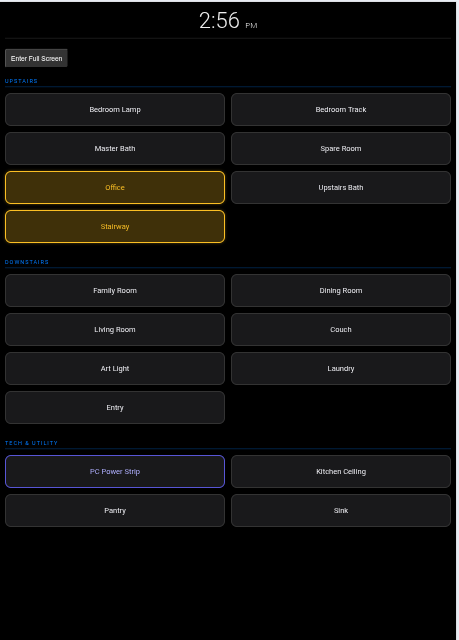
Here is where I was amazed. I went into my Home Assistant and copied its configuration file. I uploaded that to Gemini and it extracted the devices I have from the file, suggested which ones it thought I should include, and then wrote the Javascript and HTML code for the app. It also gave me instructions on where to put the file within the Home Assistant server.
I uploaded the file and it worked. Now note that I could have used a third party plugin to Home Assistant that puts Home Assistant into a Kiosk mode, but I would have had to create a Home Assistant dashboard with the devices. Also, it is likely that that page would not have run on the Nexus web browser.
What does this mean for the future. I still had to copy and paste the code, but we are already seeing AI agents that can take over even those tasks. I can see when users no longer open the Play Store to download an app, or search for a PC Program. Instead they will simply tell the AI Agent what they want the program or app to do and it will be created for them. If it isn’t exactly what you want, no problem, just tell the AI what to change.
Additional thoughts
So having AI build the new web page based interface I decided that I wanted it to run as an app, not has a web page via the browser. The problem with using the browser was that it opened with the browser tool bar and headers. So I asked the AI to build a Cordova app that simply showed the page, without using Chrome or Firefox.
It did this, but it was a bit harder. Not harder techically, harder in the sense it took the AI more time to get it right. The reason was that I am using very old hardware. Cordova has many dependencies and the AI had to figure out what version of each layer of technology would work. It eventually got there and I now have an app on the tablet that opens the kiosk mode directly.